Advent Calendar rewards reset to Day 1
In this article, we want to share important information about situations where Advent Calendar suddenly resets back to Day 1.
If you've already claimed rewards, you won't be able to receive them again on the same game account, and this issue also blocks you from getting further rewards.
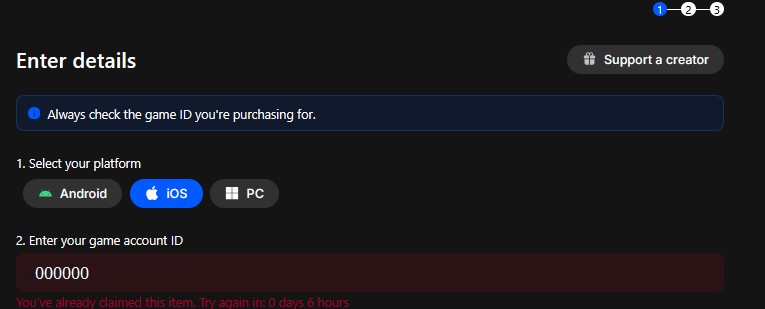
Let's take a look at what causes this and how to fix it quickly. Good news: this isn't an error in the calendar, and it can be fixed in just a few seconds! The solution is on your side, and once applied, your progress will return instantly.
The reason why this happens is simple: you were logged into the MY.GAMES Market's website, and therefore the Advent Calendar, with the wrong MY.GAMES account.
The calendar is tied to your MY.GAMES account. If you accidentally log in with a different one, the calendar will appear to start over. To restore your progress, all you need to do is sign back into the MY.GAMES account you originally used.
"But I've only ever had one MY.GAMES account!" You may think so, but please read on, as the details below explain where the mix-up happens.
There are two main ways to log in on the MY.GAMES Market's website:
1. Email and password: you enter your email and website password manually.
2. Platforms: Facebook, Google, Steam, Twitch, X (x.com), or Apple.
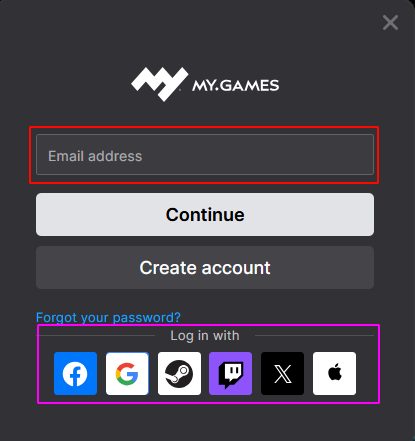
Each login method creates a separate MY.GAMES account.
This means that even if the same email address is used, an account created through a platform login is not the same as one created by entering the email manually.
Example of an incorrect login that causes the calendar progress loss:
1. You began participating in the event using a MY.GAMES account created by entering your email and setting a password: 123@gmail.com - let's call this Account A.
2. Later, you logged in by clicking the Google button. This signed you into a different MY.GAMES account - Account B.
Account B won't show any of the progress from Account A.
How to fix it:
- Log out of the current MY.GAMES account.
- Log back in using the exact method you used when you first joined the event.
Your progress will be restored, and you'll be able to continue claiming your rewards!
If you're not sure how your MY.GAMES account was registered or which login method you used when you started participating in the event, please contact our support team, and we'll be happy to help you figure it out.
However, please keep the following in mind:
1. If you missed any days in your calendar, our support team cannot adjust your progress. You will only be able to continue from the day you last claimed a reward.
2. It'll take some time for the support team to respond. While you wait, try to restore access to the correct MY.GAMES account on your own:
- Try different login methods (Email, Google, Facebook, etc.).
- Check the saved logins and passwords in your browser for our services. You may find the correct account credentials there.
- Make sure you're using the right email address for both email login and platform logins (Facebook, Google, Steam, Twitch, X (x.com), Apple).
We hope this article was helpful. If you have any questions, our support team is always happy to assist you!
Still have questions? Contact our experts